4 Types of Programmatic Advertising & How to Use Them
On this page
- Understanding the different types of programmatic advertising—including Real-Time Bidding (RTB), Private Marketplaces (PMPs), Programmatic Guaranteed, and Preferred Deals—determines exactly how you purchase your ad inventory and secure premium placements.
- Beyond the transaction models, programmatic media allows you to run ad campaigns across 7 core digital ad formats. This includes standard display and native widgets to Connected TV (CTV) and digital out-of-home (DOOH) screens.
- Using a unified Advertising OS like NEXUS consolidates these distinct buying models and ad formats into a single platform, streamlining your entire omnichannel media strategy.
- To maximize your return on ad spend (ROAS), let NEXUS’ AI optimization engine run together with broader initial targeting and conversion tracking.

If you no longer want to rely on manual negotiations, human phone calls, and static insertion orders (IOs), then shifting to programmatic advertising is the best move.
But once you decide to shift, you will be faced with a decision: which programmatic format should you choose?
In this guide, we’ll not only talk about the different types of programmatic advertising platforms, but also the different ad formats available out there. Once we’re done, you’ll have all the information you need to decide which one is best for you or your company’s needs.
Types of Programmatic Advertising
Programmatic advertising uses automation software to replace the traditional steps in media buying, such as submitting Requests for Proposals (RFPs), signing physical insertion orders, negotiating prices, and so on.
When a user visits a website or opens a streaming app, an automated auction runs behind the scenes to deliver a personalized programmatic advertisement tailored specifically to that viewer.
However, not all programmatic inventory is bought in the same manner.
There are four main transaction models, and these are as follows:
1. Real-Time Bidding (RTB) / Open Marketplace
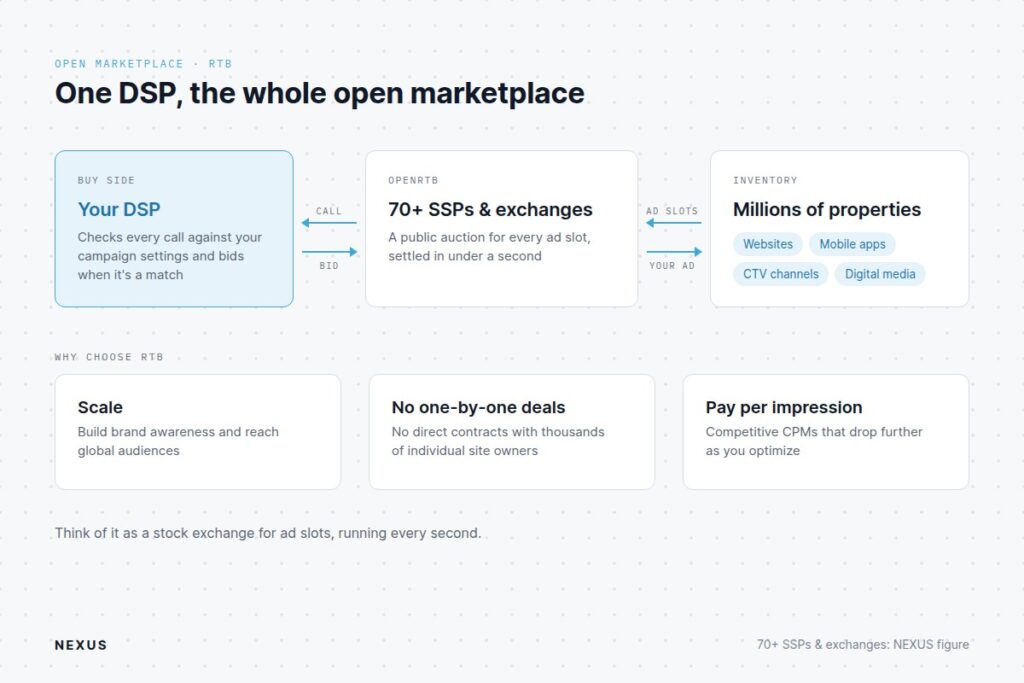
RTB is an open, public auction where an advertiser or media buyer uses a Demand Side Platform (DSP) to bid on available ad inventory across millions of websites and mobile apps simultaneously.
Every time an ad slot opens, a call from a Supply Side Platform (SSP) and/or Ad Exchange is transmitted to the DSP, and the DSP analyzes your campaign settings to see whether it’s a match for you. If your ad campaign’s a match, your bid will be submitted. And if you win the auction, your ad will be shown to the user.
Think of RTB as a busy public stock exchange where millions of ad slots are auctioned off every second to the highest bidder. With RTB, all of this happens in less than a second.
For a more comprehensive explanation of this whole process, read our guide on how programmatic advertising works.
Why Choose RTB?
RTB is ideal for scaling brand awareness and reaching global audiences.
DSPs usually connect with several SSPs and Ad Exchanges, eliminating the need for you to negotiate direct contracts with tens of thousands of individual website owners one by one.
If you’re deciding between buying through a DSP or a fixed-placement network, see our breakdown of DSP vs. ad network.
NEXUS, for instance, connects directly to 70+ SSPs and Ad Exchanges through the OpenRTB protocol, so you would literally have access to millions of individual websites, mobile apps, CTV channels, and digital media properties.
If your campaign is a performance-driven one, RTB can also be your best option since you only pay when your ad is shown to a user, thereby allowing you to reach audiences at competitive CPM (Cost Per Thousand) rates.
Once you learn how to properly optimize your campaigns, you can drive the costs down even further.
2. Private Marketplace (PMP)
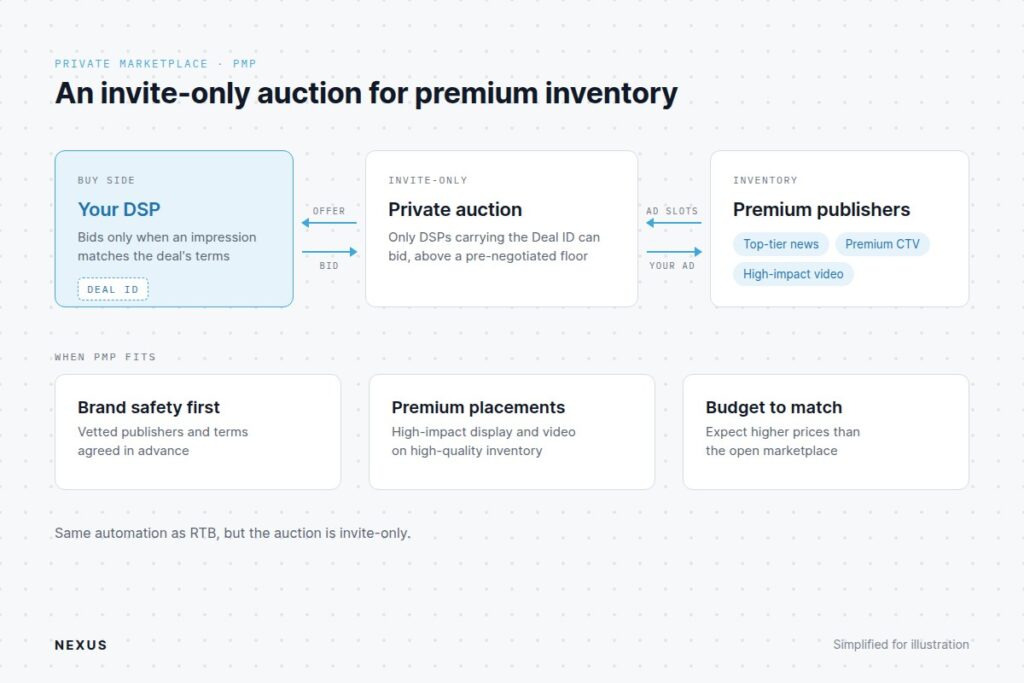
A Private Marketplace is an invite-only programmatic auction where premium publishers reserve high-quality ad placements for a select group of vetted advertisers.
Everything is still automated, though. Publishers issue a unique Deal ID—a custom string of characters containing negotiated trading parameters—to specific buyers. When an impression matches the criteria specified in the PMP configuration, the publisher’s supply path offers the auction exclusively to DSPs carrying that Deal ID.
Pricing is determined via dynamic bidding above a pre-negotiated floor price.
The process is the same as with RTB, except PMP is not open to everyone.
Top-tier news publications or premium CTV channels offer ad placements, so you can expect the price to be high.
Why Choose PMP?
Choose a Private Marketplace if brand safety is of utmost priority and you or your client has the ad budget for it. This is also useful for high-impact display or video initiatives requiring premium ad placements.
3. Programmatic Guaranteed
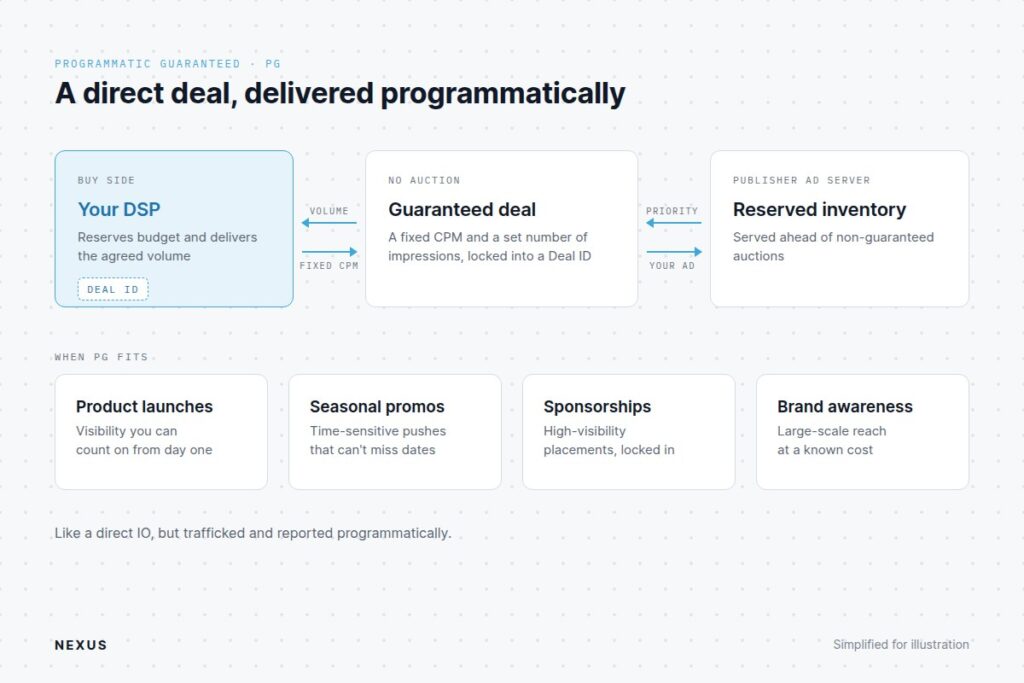
Programmatic Guaranteed is also known as Programmatic Direct or Automated Guaranteed. It follows the same process as traditional direct insertion orders, though Programmatic Guaranteed utilizes programmatic infrastructure for automated workflow execution, trafficking, and reporting.
As with usual direct IOs, the buyer and the publisher agree upon a fixed CPM rate and a guaranteed volume of impressions, locking the deal into a specialized Deal ID.
The DSP reserves the budget and automatically fulfills the agreed-upon impression volume over the set campaign schedule.
This doesn’t automatically mean all of a publishing property’s traffic goes to the buyer (unless they have agreed to that); rather, the publisher’s ad server prioritizes this deal above non-guaranteed auctions.
Why Choose Programmatic Guaranteed?
As its name implies, the advertiser will receive traffic, guaranteed.
Guaranteed traffic is useful for:
- product launches
- time-sensitive or seasonal promotions
- high-visibility sponsorships
- large-scale brand awareness campaigns
4. Preferred Deals
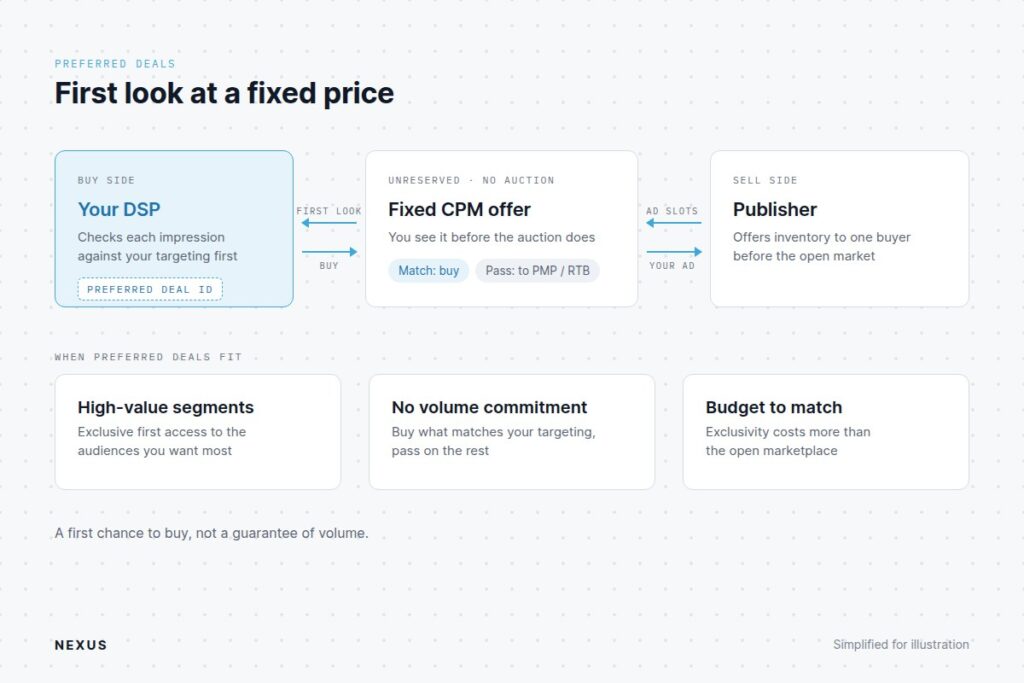
Preferred Deals give buyers unreserved, first-look access to a publisher’s inventory at a negotiated, fixed CPM price before that inventory is exposed to the open auction.
The buyer gets the option to purchase the rest of the traffic, or to pass—all programmatically.
The way it works is the publisher offers inventory to a buyer via a Preferred Deal ID at a fixed price. When a user lands on the publisher’s property, your DSP gets an initial opportunity to purchase the impression for you at the set price. If the impression does not match your campaign’s targeting criteria, the DSP will choose not to bid and the call for Preferred Deal falls through, dropping the impression into the PMP or RTB open market.
Why Choose Preferred Deals?
When it comes to the types of programmatic advertising deals that focus on high-value targets, Preferred Deals is your ideal choice.
You will not be required to purchase all traffic—just exclusive access to high-value segments. And the DSP will still check against your campaign settings to see if the impression matches your criteria.
However, the exclusivity also comes at a higher cost.
Programmatic Transaction Models Compared
| Transaction Model | Pricing Structure | Inventory Guarantees | Primary Use Case |
| Real-Time Bidding (RTB) | Dynamic CPM (Auction) | Non-Guaranteed | Performance marketing, audience prospecting, and wide-reach retargeting |
| Private Marketplace (PMP) | Dynamic CPM (Floor Price) | Non-Guaranteed | High-impact vertical campaigns in curated, premium publisher environments |
| Programmatic Guaranteed (PG) | Fixed CPM | Guaranteed Volume | Tier-1 brand awareness, seasonal product launches, and reserved sponsorships |
| Preferred Deals | Fixed CPM | Non-Guaranteed (First-Look) | Targeted audience buying where fixed rates are desired without volume commitments |
7 Types Of Programmatic Advertising Formats
While transaction models define how you buy media, programmatic ad formats dictate where and how your brand message is displayed to the user, which is why learning these are as equally important.
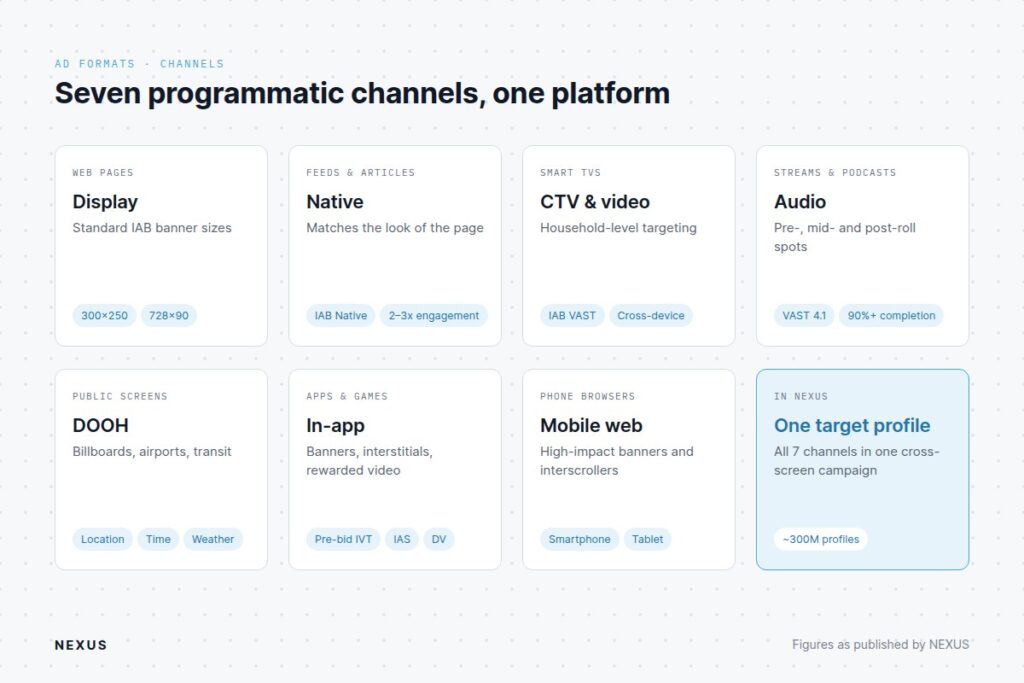
Programmatic advertising spans virtually every digital screen and medium, though NEXUS supports 7 programmatic channels. The platform allows media buyers to manage cross-screen campaigns under a single target profile.
If you’re comparing platforms by channel coverage, see our list of the best programmatic advertising platforms.
1. Display Ads
Visual banner ads appear across web pages in standard Interactive Advertising Bureau (IAB) dimensions (e.g., 300×250 medium rectangle, 728×90 leaderboard, 160×600 wide skyscraper, and 320×50 mobile banner).
2. Native Ads
Ad units designed to visually match the surrounding editorial content of a website or app. Built on the IAB Native specification, these include in-feed sponsored stories, recommended content widgets, and in-article promotional blocks.
Native units deliver 2–3x higher engagement than standard display banners because it looks like a natural part of the page. NEXUS combines contextual text matching with its ~300M person profile graph to place relevant native recommendations, making viewers more inclined to engage with the ad.
3. Connected TV (CTV) Ads & Programmatic Video
These are video commercials delivered on internet-connected Smart TVs (such as Roku, Apple TV, or Samsung TV) during TV shows or movies. Built on the IAB VAST (Video Ad Serving Template) standard, CTV offers high completion rates on living-room screens.
By mapping household IP addresses and Smart TV identifiers to its ~300M person profiles, NEXUS enables household-level targeting and cross-device attribution. So when a conversion happens on a mobile device or laptop within the same household, it will be tracked to the CTV ad impression.
4. Digital Audio Ads
Audio spots integrated into music streaming services, online radio, and podcasts under IAB VAST 4.1, which now covers audio. It supports pre-roll, mid-roll, and post-roll streaming audio plus host-read and dynamically inserted podcast ads.
Ads are delivered across Triton Digital, SXM Media, iHeart, and Spotify, and achieve 90%+ completion rates.
5. Digital Out-of-Home (DOOH) Ads
These include programmatically traded digital billboards, airport screen networks, transit displays, and elevator screens. These can be targeted dynamically by location, time of day, and other real-time triggers such as weather and foot traffic.
6. In-App Ads
In-App ad placements include display banners, full-screen interstitials, and rewarded video ads inside mobile applications, utilities, and games. With this placement, NEXUS applies multi-layered pre-bid invalid traffic (IVT) controls, amplified by IAS and DoubleVerify protection, to defend ad campaigns against fraud.
7. Mobile Web Ads
These are high-impact banners and interscroller units optimized specifically for smartphone and tablet web browsers. Publisher properties include online news, mobile search results, and web publications.
See how NEXUS runs this on your data
Everything in this article runs on NEXUS today. See the Programmatic Advertising Platform page.
Inside NEXUS: A 6-Step Campaign Setup Walkthrough
The entire programmatic media buying system and all its working components can be a bit overwhelming to process for a first-timer. However, once you see the inside of an Advertising OS, it’ll be easier to understand how everything operates. For a more detailed walkthrough, see our guide on how to use programmatic advertising.
NEXUS organizes campaign configuration into a streamlined, step-by-step workflow that gives ad ops teams granular control over bidding, targeting, and inventory selection.
Here’s a clear 6-step guided workflow:
Step 1: General Campaign Details
Enter core identification details:
- Campaign Name: Assign a clear naming convention
- Campaign Category: NEXUS uses IAB Categories
- Schedule: The start and end date/time of your entire campaign
- Spend Cap: Total and daily spend limits
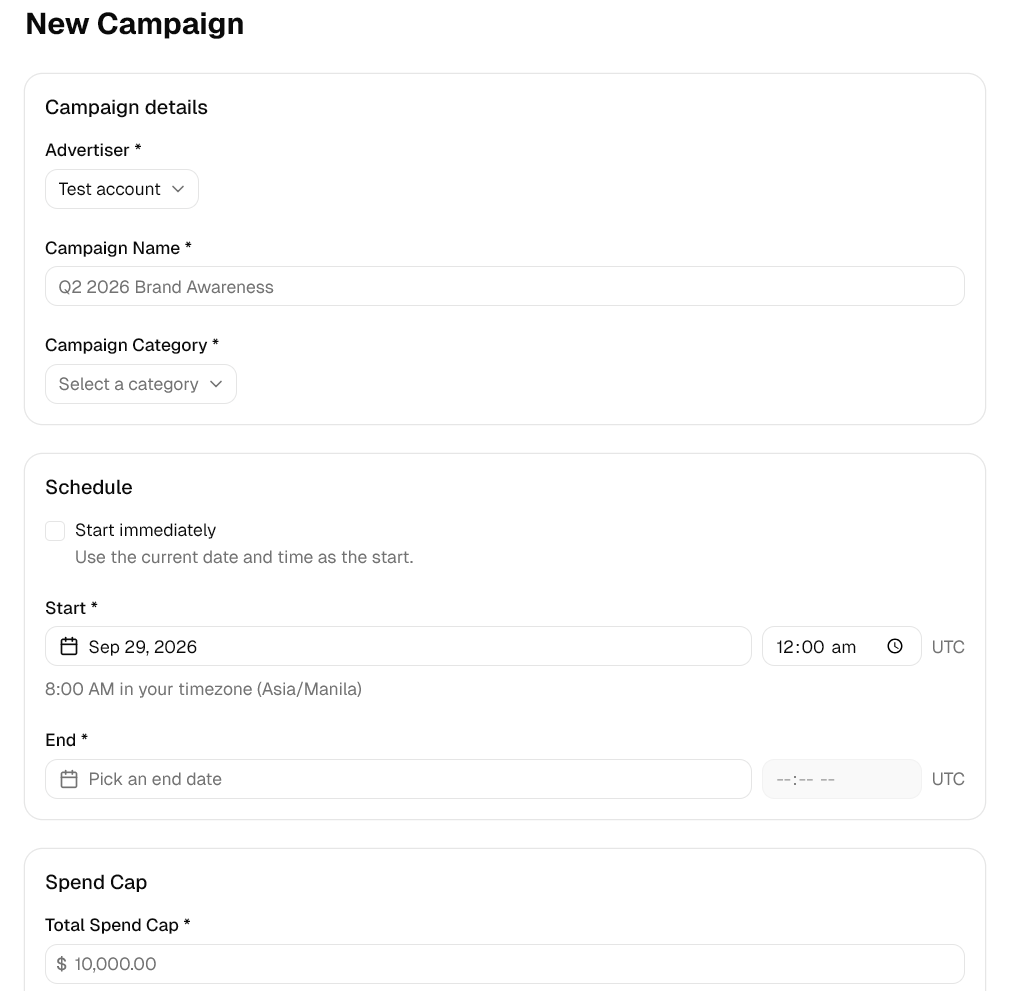
Each campaign can house several ad sets, which is necessary for A/B testing creatives and channels.
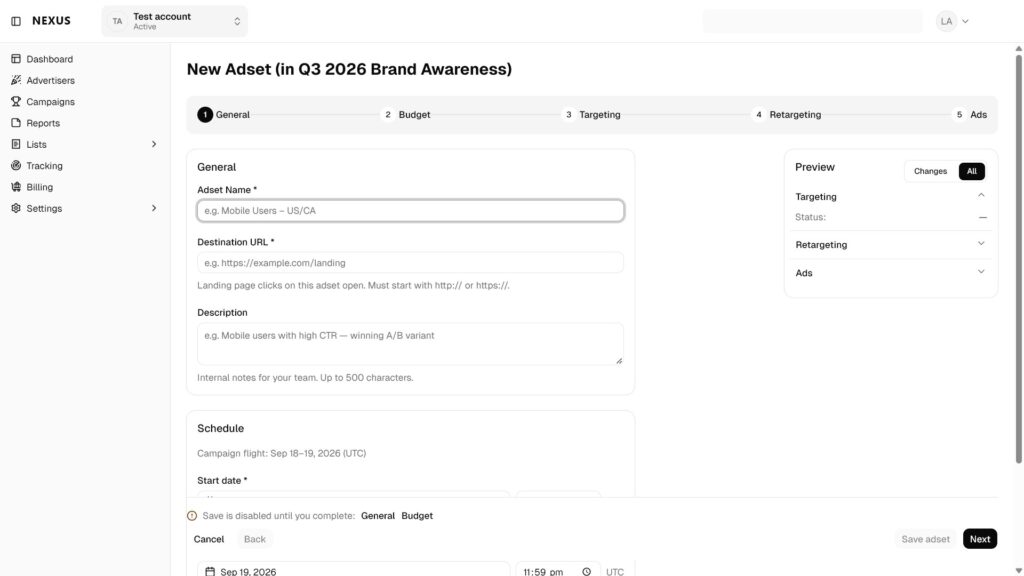
Step 2: Creating an Ad Set
- Ad Set Name
- Destination URL: Set the target landing page where users will land upon clicking.
- Description & Schedule: Define internal campaign notes and start/end dates.
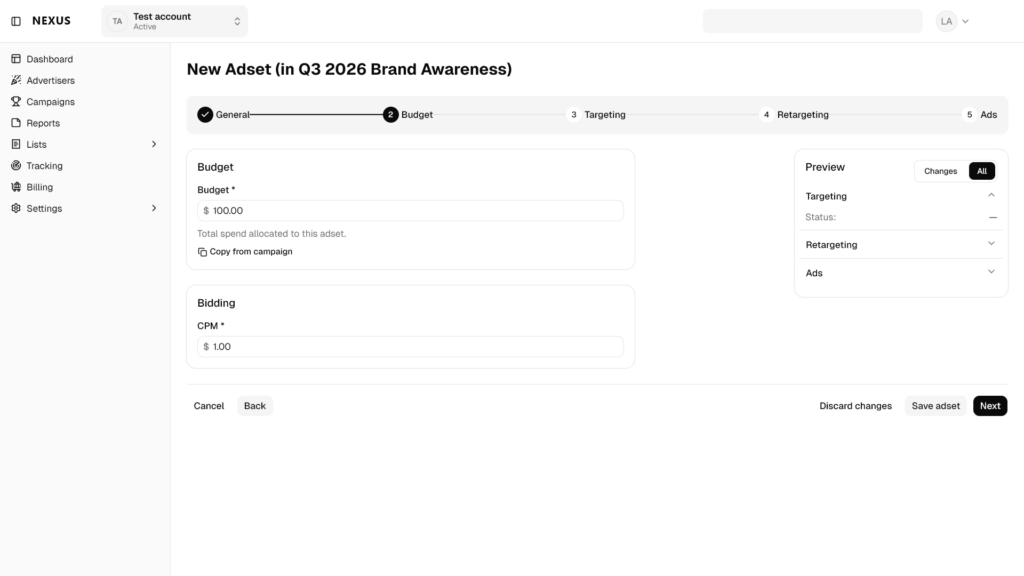
Step 3: Ad Set Budget & Bidding
Define campaign financial parameters:
- Total & Daily Spend Caps: Set hard expenditure limits to manage pacing.
- Target CPM / Bid Rates: Set maximum bid valuation per thousand impressions.
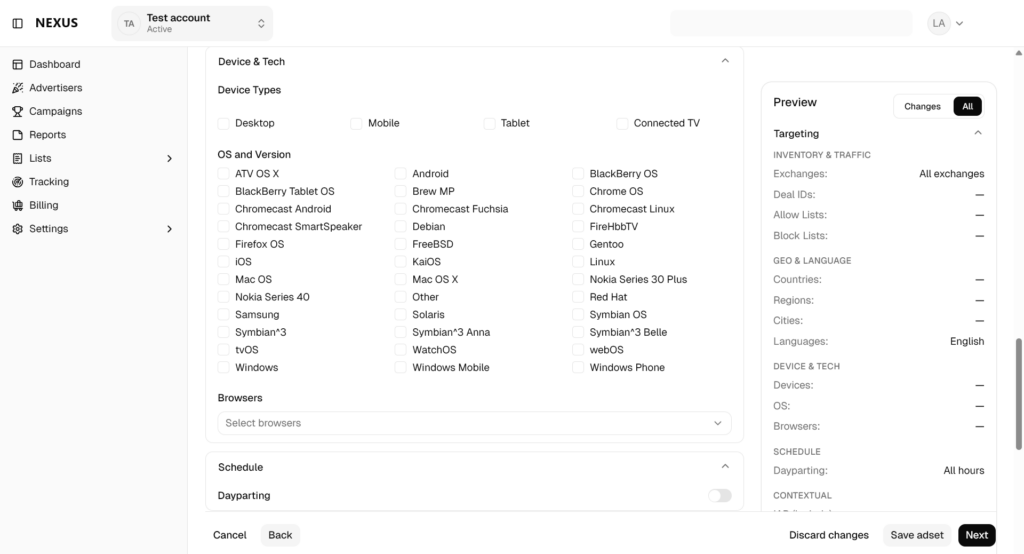
Step 4: Ad Set Targeting (6 Supported Dimensions)
NEXUS restricts targeting to 6 documented dimensions to guarantee platform accuracy:
- Geographic: Target viewers by country, region, state, or city.
- Behavioral: Reach users based on historical digital actions, app usage, and browsing habits.
- Contextual: Match ad placements to the specific theme or category of the surrounding page content.
- Custom: Ingest first-party customer lists or custom segment data.
- Lookalike: Use NEXUS’s profile graph (~300M person profiles) to automatically identify new users who share characteristics with your top converters.
Step 5 (Optional): Ad Set Retargeting
Configure re-engagement rules, pixel event triggers, and audience recency windows (e.g., users who visited within the past 14 days).
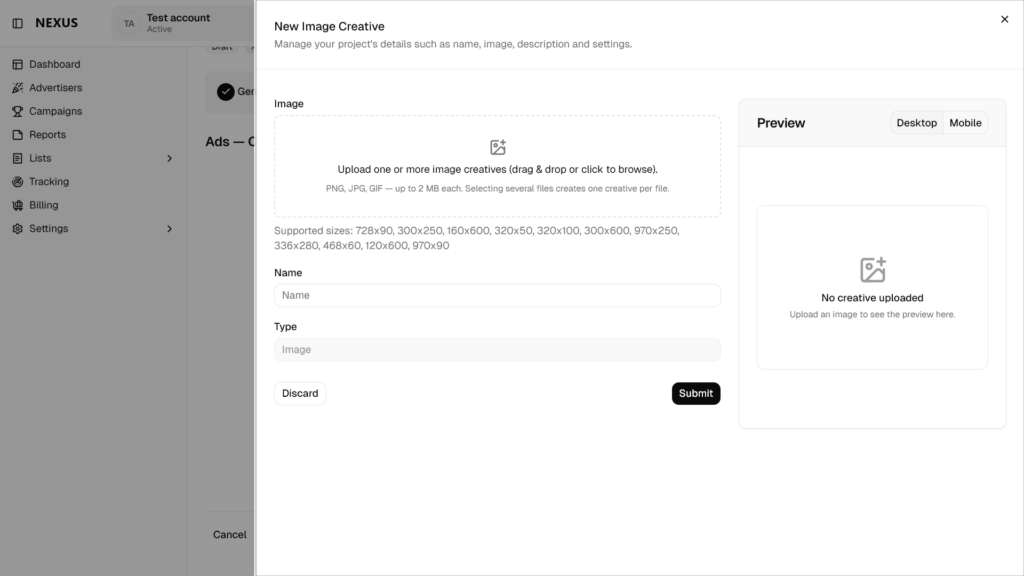
Step 6: Ads (Creatives)
Upload or select creative assets across display banners, native widgets, VAST video files, or audio files, establishing a complete omnichannel programmatic advertisement strategy.
Expert Tips to Improve Programmatic Results
To help new advertisers maximize campaign return on ad spend (ROAS), NEXUS programmatic experts recommend five core best practices:
Tip 1: Avoid Over-Narrowing Your Audience at Launch
Resist the urge to combine too many targeting filters when launching a new campaign. Over-filtering prevents NEXUS’s AI Optimization Engine from reaching the impression volume required for its daily self-learning loops. While geographic targeting can be strict, you can start with broader contextual or behavioral targeting. If applying lookalike audiences, remove contextual and behavioral targeting limits.
These will allow the system’s Audience Prediction models to discover high-converting audience segments that weren’t initially obvious.
Tip 2: Apply Universal Cross-Channel Frequency Capping
Because NEXUS operates as a unified Advertising OS across all 7 programmatic channels, set a single frequency cap (e.g., maximum 3 exposures per user per day) across display, CTV, and podcasts. This prevents ad fatigue and avoids wasting budget by over-exposing the same user across different devices.
Tip 3: Leverage Multi-Identity Resolution for Cookieless Reach
Signal loss from browser and OS privacy restrictions means using privacy-first identity solutions. Identity is one of the key programmatic advertising trends shaping how teams buy in 2026. Activate cross-device targeting using NEXUS’s 4 identity solutions (NEXUS Native ID, UID2, ID5, plus an industry-standard solution) to make sure ads are delivered to the right people.
Tip 4: Set Up Conversion Tracking
Whether you’re in the performance marketing industry or you just want to be able to accurately calculate your ROAS, setting up conversion tracking is necessary. NEXUS provides multi-layered conversion tracking and measurement capabilities across web, mobile, and Connected TV (CTV) environments.
Takeaways
- Match Programmatic Media Buying Type to Objective: Use RTB open auctions for broad reach and scale, PMPs for contextually sensitive premium inventory, and Programmatic Guaranteed for reserved, fixed-cost campaigns.
- Execute Omnichannel Campaigns: Unify your campaign across Display, Native, CTV, Audio, DOOH, In-App, and Mobile Web under a single platform for better ad delivery and more accurate reporting.
- Trust AI Learning Loops: Avoid over-constraining audience parameters at launch; allow daily self-learning bid optimization and audience prediction models to find converting user pools across ~300M profiles.
- Utilize the NEXUS Platform Advantage: Consolidates DSP buying, ~300M profiles, 6 targeting dimensions, dual AI optimization, and IAS/DoubleVerify brand safety into a single Advertising OS.
Frequently asked questions
The main types of programmatic advertising include four core transaction models—Real-Time Bidding (RTB), Private Marketplaces (PMP), Programmatic Guaranteed, and Preferred Deals—spanning formats such as display, native, video, audio, and Connected TV. NEXUS AI unifies all of these buying models and formats into a single Advertising OS, giving media buyers streamlined access to 70+ ad exchanges and ~300M person profiles.
Private Marketplace (PMP) is an invite-only auction that uses a Deal ID, while Real-Time Bidding (RTB) is an open auction marketplace accessible to all. NEXUS supports both OpenRTB auctions and custom Deal ID ingestion across 70+ SSPs and ad exchanges.
Programmatic Guaranteed (PG) is an automated direct transaction where a buyer and publisher agree on a fixed CPM price and a reserved, guaranteed volume of impression inventory for a specific schedule. NEXUS AI runs programmatic guaranteed advertising on the same shared engine as open marketplace auctions, so there would be no conflict when it comes to applying a campaign's frequency and cross-device limits.
For small businesses and growing direct brands, Real-Time Bidding (RTB) open auctions accessed through a programmatic ad network like NEXUS is the best option. It's affordable and AI-optimized, targeting is precise, and there are no fixed contracts—you only pay a percentage of media fee.
Virtually all digital ad formats can be bought programmatically. NEXUS AI natively supports all 7 programmatic channels under industry IAB specifications, enabling a unified programmatic advertisement strategy across all user touchpoints.



Request access to NEXUS
See how this runs on your own data. Request access to get started.
Request Access