Programmatic Advertising: How to Use It in 2026
On this page
- This guide teaches you how to use programmatic advertising to automatically reach your audience the moment an opportunity opens up.
- Programmatic advertising uses automated technology and real-time bidding to buy and optimize digital ad inventory, replacing slow manual negotiations.
- With programmatic advertising, you can target audiences based on their device, behavior, location, context, and more.
- Use an Advertising OS like NEXUS to consolidate your media buying, data activation, and reporting into a single platform.
- To maximize your return on ad spend (ROAS), launch your campaigns with broader targeting and allow the AI optimization engine to find the most profitable audience segments.

Time is valuable—more so in the age of digital advertising. If you’re still relying on traditional systems of advertising where you purchase ad space for a fixed price, you may be losing out on ad spaces you never even knew existed.
That’s what programmatic advertising is trying to fix.
If you are figuring out how to learn programmatic advertising from scratch, the best approach is to break down the core mechanics step by step.
In this quick guide, we’ll define and discuss how to use programmatic advertising in 2026 and beyond.
How does programmatic advertising work?
Programmatic advertising, in simple terms, uses automated technology to buy, manage, and optimize digital ad spaces rather than rely on manual negotiations or fixed-price insertion orders.
If you want to understand exactly how does programmatic ad buying work under the hood, we first need to define some key terms.
- Real-Time Bidding (RTB) – The process by which an automated auction runs when there is a request for an ad space to be filled. The entire mechanism happens in less time than it takes for the requesting app or page to load.
- Supply-Side Platform (SSP) – The platform or service that publishers (suppliers) use to sell their ad inventory.
- Demand-Side Platform (DSP) – The platform or service that advertisers (buyers) use to buy ad spaces or impressions.
- Ad Exchange – The platform that brings together the supply side and the demand side to facilitate an exchange. Think of it like an online advertising marketplace.
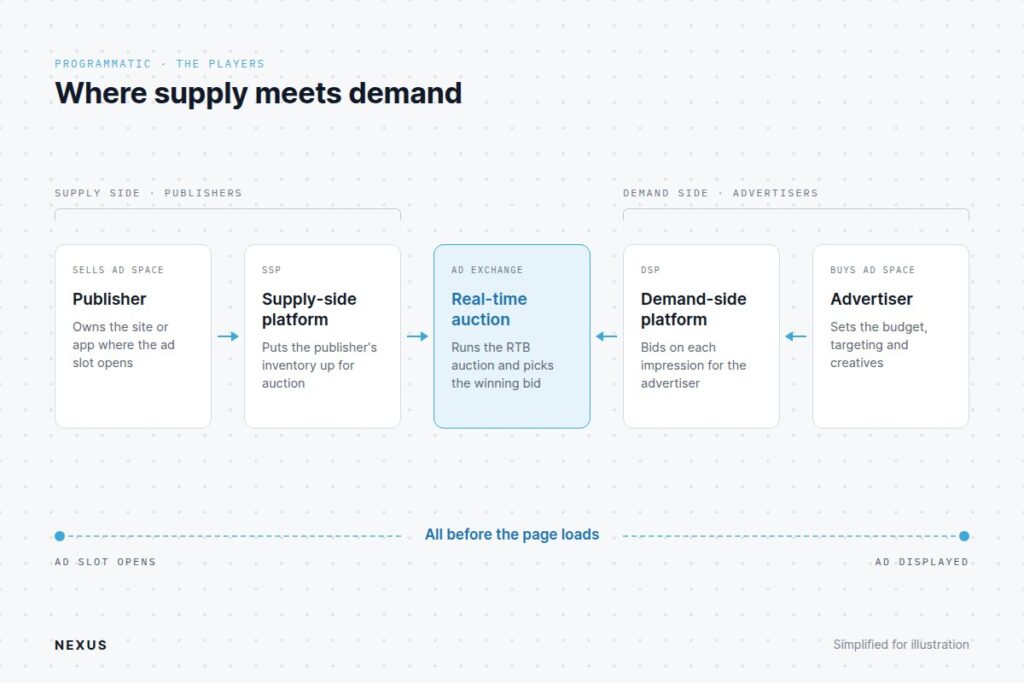
Now let’s talk about the entire operational sequence of a single programmatic auction.
- Impression Trigger: A user visits a digital property (a news site, mobile app, a podcast, or Connected TV stream). The code installed on the page or app then notifies the SSP.
- Bid Request Generation: The publisher’s SSP generates a bid request containing impression details. This can include ad unit size, device type, geographic location, and audience signals.
- Ad Exchange Open Call: The ad exchange receives the bid request and sends information to all DSPs it is connected with, informing them that it is now running an auction (RTB).
- DSP Evaluation: The DSP checks the impression details against all active media buying campaigns in its platform. It verifies the targeting parameters and confirms whether the campaign can participate in the live auction based on the campaign’s budget, pacing, ad schedule, frequency caps, and so on.
- Bid Submission: If the impression matches your campaign parameters, the DSP calculates a bid price using real-time algorithms and bid limits, then submits a response.
- Auction Resolution & Ad Rendering: The auction resolves (either as a first-price or a second-price auction), the highest valid bid wins, and the creative of the winning campaign renders on the user’s screen.
Some platforms can simplify this flow by combining SSP, Ad Exchange, and DSP in one place; hence, these six steps can easily be reduced to three.
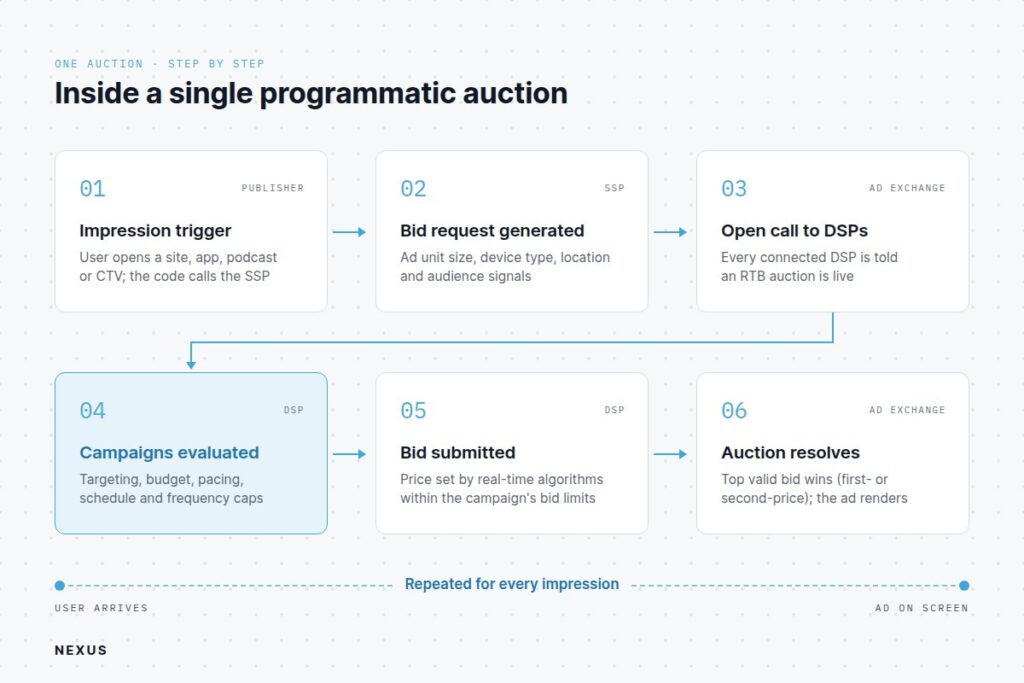
Inside the NEXUS Advertising Operating System, this entire evaluation and bidding loop completes in approximately 100 milliseconds per decision.
NEXUS’ global infrastructure typically handles over 5 million peak queries per second (QPS).
How to get started with programmatic advertising
For an agency media buyer, running programmatic advertising means setting campaign parameters, defining targeting criteria, uploading creative assets, and letting an automated engine evaluate billions of individual impressions in real time.
So, in order to get started, you must first choose programmatic advertising platforms to work with.
Instead of jumping between disconnected software tools, a media buyer can use an advertising OS like NEXUS as a unified platform to execute campaigns, manage supply access, activate first-party data, and audit media spend.
| Functional Layer | What It Handles in the Workflow | Media Buyer Value |
|---|---|---|
| Demand-Side Buying (DSP) | Campaign configuration, budget pacing, real-time bidding, frequency capping. | Single interface for campaign management across all digital media. |
| Audience Engine | First-party data compilation, audience segmentation, identity resolution. | Precise targeting using ~300M person profiles and ~1,000 pre-built segments. |
| Optimization Engine | Uses machine learning models for bid pricing and predictive audience expansion. | Runs automated self-learning daily in order to maximize campaign ROAS and CPA performance. |
| Reporting & Audit | Impression-level audit logs, ~80 report dimensions, hourly data refresh. | Full fee transparency and granular campaign performance visibility. |
In simpler terms, when you operate a programmatic advertisement across multiple channels, a unified OS ensures that a single frequency cap, budget limit, and target profile applies across all ad formats.
So whether the user sees a display banner, listens to a podcast, or watches a Connected TV ad, everything adheres to the campaign settings you’ve set.
See how NEXUS runs this on your data
Everything in this article runs on NEXUS today. See the Programmatic Advertising Platform page.
How to Narrow Down Your Audience in a Programmatic Advertising Environment
When learning how to do programmatic advertising, one of the most common concerns is how to show the ads to your exact audience.
Being able to target the correct audience is a surefire way to avoid unnecessary ad spend; hence, your DSP or Advertising OS should be able to provide targeting filters.
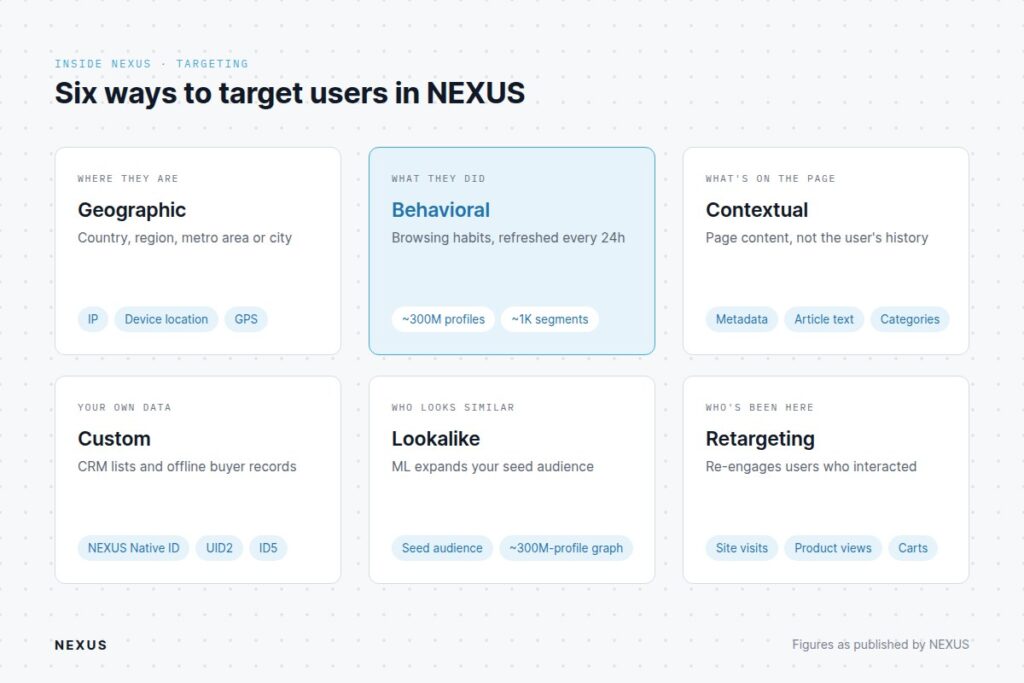
In NEXUS, there are six dimensions for targeting users.
1. Geographic Targeting
Advertisers and/or media buyers can target users based on country, region, metro area, or city. IP mapping, device location services, or GPS data passed in the bid request are used to determine the location.
2. Behavioral Targeting
This allows you to reach users based on historical digital actions or browsing habits. NEXUS draws on ~300M person profiles and ~1,000 pre-built behavioral segments updated on a dynamic 24-hour refresh cycle.
3. Contextual Targeting
The context is evaluated based on the content of the publishing property instead of the user’s browsing history. Contextual engines scan page metadata, article text, and category classifications. If content relevance is important for your ads, this targeting parameter can prove to be highly beneficial. Common programmatic advertising examples include serving travel ads alongside flight-booking articles or displaying gaming monitor banners on video game review sites.
4. Custom Targeting
This utilizes your agency’s or client’s proprietary audience segments that you upload into the platform. Custom data (such as CRM lists or offline buyer records) is onboarded and matched securely using NEXUS Native ID, UID2, or ID5 identity frameworks.
5. Lookalike Modeling
Once a seed audience is available (based on active campaign data or from custom data), our machine learning algorithms evaluate them to find lookalike profiles across our ~300M profile graph that demonstrate similar behavioral traits.
6. Retargeting
User interactions such as visiting a website, viewing a product page, or abandoning a shopping cart can be used as triggers to re-engage users who have previously interacted with you or your client’s digital properties.
This performs well when ads shown are matched to the user’s status in the conversion funnel.
How to Use Programmatic Advertising Platform like NEXUS
The easiest way to discuss getting started with programmatic advertising is by actually showing how it’s done.
Let’s take a look at inside NEXUS.
First things first, keep in mind that a campaign only runs when the account is funded. You can connect your card for automated billing, or you can prefund your account to manage your advertising budget.
NEXUS accepts payment through credit or debit cards, as well as bank transfers. A minimum deposit of $30,000 is required.
Once that is done, head over to the Advertisers tab to create your first advertiser. This is a required step since each campaign must be assigned an advertiser.
Now go to the Campaigns tab to create your first campaign.
Initial campaign creation requires you to provide the basic details of the campaign: Advertiser, Campaign Name, and Campaign Category. NEXUS follows the standardized IAB tiers for categories.
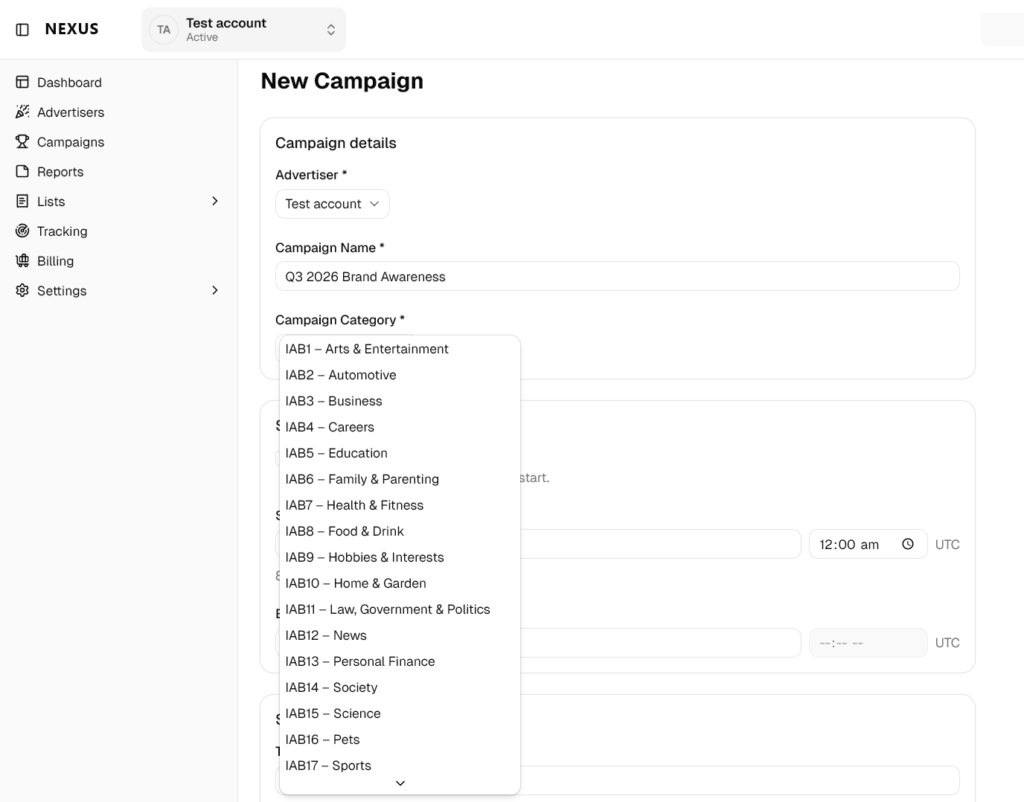
Next is the campaign schedule, which allows you to pick a start and end date for your campaign (in UTC). You can also have the campaign start immediately once it is approved.
After which is the Spend Cap section, which requires you to set the Total Spend Cap for the entire campaign. A daily spend cap option is also available.
Once the initial campaign configurations have been saved, the next step is to create the ad sets. You can
Ad set creation follows a five-step workflow, which is as follows:
1. General configuration – ad set name, destination URL, description, schedule
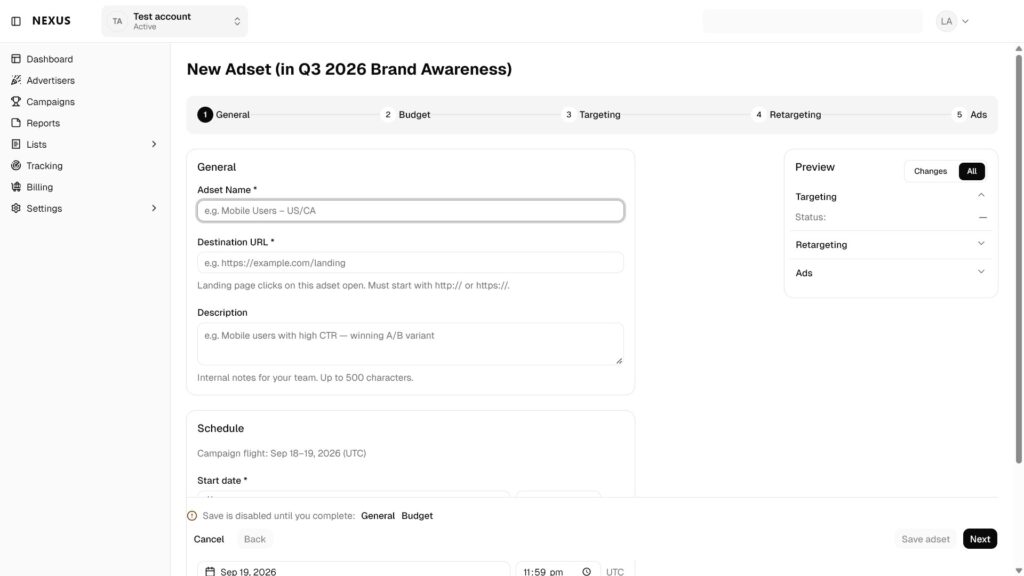
2. Budget – total allowable ad spend and CPM bid
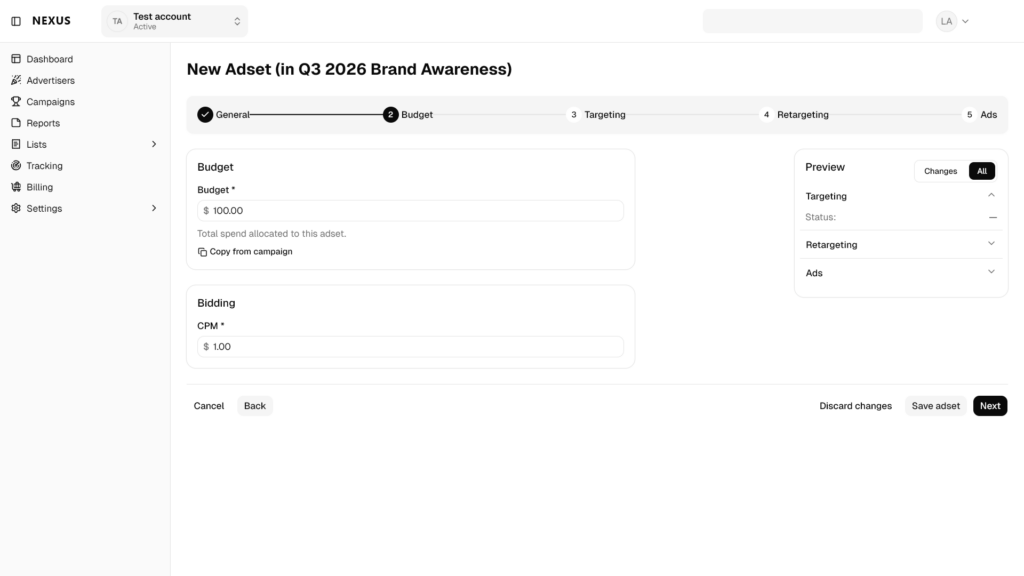
3. Targeting
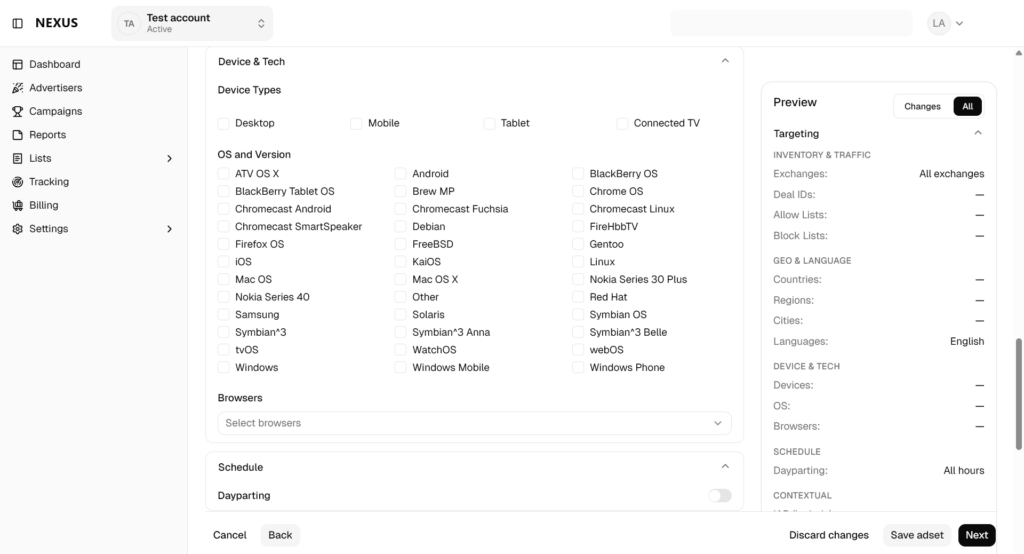
This is one of the most important aspects of any media buying campaign setup. You can configure your targeting filters by selecting any of the available options for:
- Geolocation – country, region/states, cities, language
- Device & Tech – device types, OS & version, browsers
- Contextual – positive IAB Categories (to include), negative IAB Categories (to exclude), keywords (to include), and negative keywords (to exclude)
Selecting specific ad exchanges, SSPs, and domain lists is also possible.
You can likewise enable dayparting so that your ads will only show at specific time of the day or day of the week.
4. Retargeting
This is an optional step. Once you have enough data from active campaigns or you have uploaded proprietary audience segments, you can configure an ad set for retargeting.
5. Ads
The final step in the workflow is adding creatives. There is no limit to the number of ad creatives you can upload per ad set.
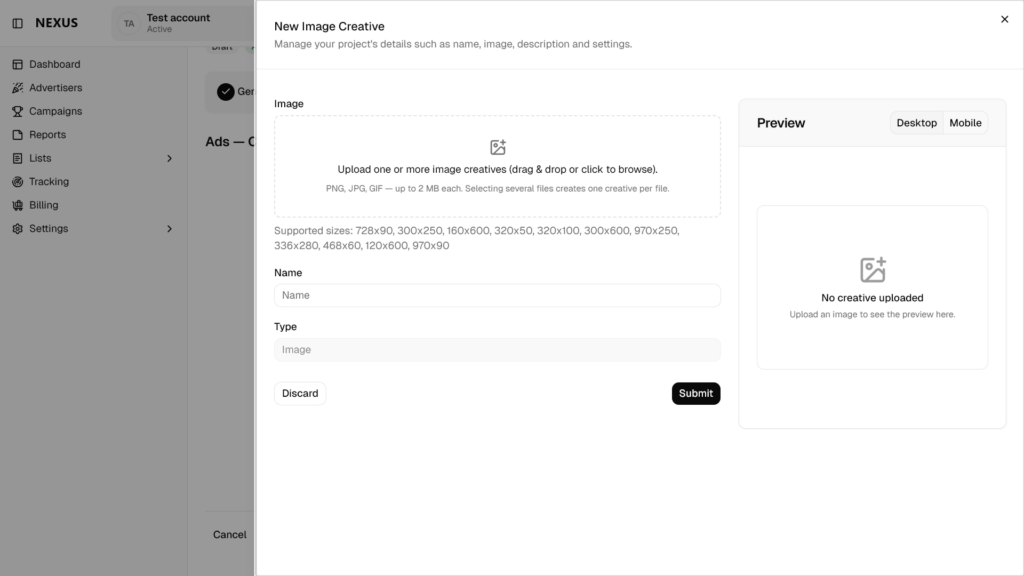
Upload all your creatives and then Save & Activate the campaign. As soon as your campaign is approved, it will start buying traffic, and the results will be displayed in the comprehensive Reports tab.
Adding multiple creative variants within an ad set enables NEXUS’s production AI workflows to evaluate creative performance in real-time and automatically send more traffic to the high-converting ones.
How to improve the results of your ad campaigns in NEXUS
- Leverage NEXUS’s dual AI optimization workflows
NEXUS offers Bid Optimization and Audience Prediction. The first one is a machine learning model that adjusts bids in real time to improve both win rates and CPA, while maximizing campaign ROAS.
The latter predicts and targets the best-performing segments based on uploaded or predetermined high-performing audiences.
AI is taking on a bigger role across programmatic buying this year. See our overview of programmatic advertising trends to learn what’s changing in 2026.
- Avoid Over-Narrowing at Launch
Unless you are working with a historical, proven custom audience segment, resist the urge to stack too many targeting constraints when launching a new campaign. Doing so may limit the impression volume you receive, leaving you with insufficient data to evaluate real ad performance.
Also, you won’t be able to maximize the platform’s AI Optimization Engine if you hyper-target audiences at the onset.
Takeaways
- Now that you understand how to use programmatic advertising, the next step is putting it into practice. Here is your action plan to get started:
- Consolidate your tools: Start by selecting a unified Advertising OS like NEXUS so you can manage your media buying, targeting, and reporting in one place.
- Set up and fund your account: Create your advertiser profile within the platform and connect your payment method or prefund your account so it's ready for media buying.
- Build your campaign foundation: Create your campaign by establishing core details like your schedule, spend caps, and targeting. Configure your geographic, device & tech, and contextual targeting filters.
- Select ad formats and upload your creatives: Choose your desired ad formats and upload multiple creative variants to your ad sets. This gives the system enough options to test and identify the highest-converting assets.
- Launch and optimize: Activate your campaign and allow the platform's AI engines to automatically optimize your bids and predict the best-performing audience segments in real time.
Frequently asked questions
When looking at programmatic advertising vs traditional advertising, the main difference is that with programmatic advertising, buying and selling happens on-demand using automated systems like the OpenRTB protocol. Traditional advertising, on the other hand, relies on manual media buying and price negotiations between advertisers and publishers.
Not strictly, no. Other ways to participate in programmatic advertising include ad exchanges, managed services, and programmatic ad networks like NEXUS AI. Keep in mind, though, that the automated buying processes happen behind the scenes of whichever platform you choose. The platform may change but the mechanism does not.
Absolutely! Small businesses can effectively use programmatic advertising to reach targeted audiences by leveraging NEXUS AI's Programmatic Ad Network.
Setting up and launching a programmatic ad campaign in NEXUS AI only takes a few minutes. All you need to do is finish the 5-step workflow and your campaign will start running as soon as you press Activate.
The programmatic advertising cost depends on your marketing goals. For meaningful results, we recommend starting with $1,000 to $10,000 a month. At NEXUS AI, you can set a daily advertising budget and a total campaign budget so you can manage your ad spend and scale as needed.



Request access to NEXUS
See how this runs on your own data. Request access to get started.
Request Access